Installation and enabling the Network Server option
The network option must be chosen during the installation of the driver, so the computer's local firewall will be correctly configured while the installer is running.
You can click "Enable Server" configuration option after installation, however the Firewall may not be configured correctly.
- Download the latest CodeMeter Runtime from:
- Our website:
https://downloads.mxrap.com/Dongles/codemeterruntime.exe - CodeMeter's website:
https://www.wibu.com/support/user/user-software.html
Choose the 64-bit option from the "CodeMeter User Runtime for Windows" section.
- Our website:
- Install (or Reinstall) the CodeMeter Runtime
Note: This requires Administrator rights
Choose "Network Server" during this step.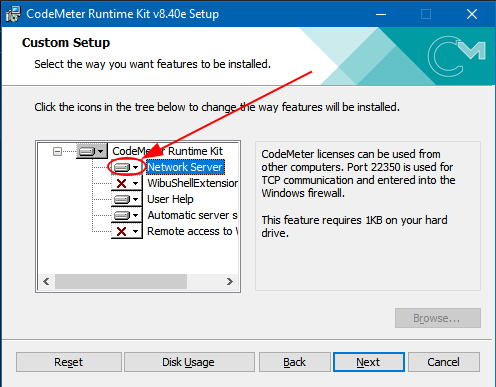
- Install or plug in the dongle - see options below
- Configure the Write-Access password to allow users to kick other users off the licence, see instructions here
Licence Key Options
You must install a CodeMeter dongle, which can be either:
- A physical USB key
- A software-based key installed onto the computer
- An "online" key installed onto the computer
Option: Physical USB Dongle
A physical USB is our preferred option for flexibility and reliability.
A USB can be moved to different servers, and will not break when the Internet is down or the server's hardware configuration changes.
To install:
- The mXrap team will provide a USB-A or USB-C key
- Plug into the server, either by:
- The USB can be plugged directly into the server
- or, plugged into a network USB hub and accessed by the server over the network via products such as AnywhereUSB.
- More details can be found here
Note for AnywhereUSB: ONLY server should access the dongle via AnywhereUSB. Do NOT set up the system so multiple clients access the dongle via AnywhereUSB.
The CodeMeter dongle is not designed to operate that way, and we have seen problems when used like this.
Option: Software Dongle
A software-based key can be installed onto the computer.
This is an option if they physical USB key is not an option, however this key is "bonded" to the machine's hardware configuration, and will "break" when the computer's hardware configuration changes.
The dongle cannot be transferred to another computer.
Option: "Online" Dongle
A software-based dongle is hosted by the CodeMeter company on a server external to the site, on the Internet. This dongle does not require physical USBs, nor does it "break" when your server's configuration changes.
The disadvantage is this key depends on another server on the Internet and adds an additional point of failure and depends on a reliable Internet connection.
The Online Dongle is typically installed onto a central computer for clients to access in the same way as a USB or Software Dongle.
It is possible to install this licence onto each individual client computer, however, this does not give users the ability to kick other users off the shared licence.