Error resolution
In very rare situations, you may encounter an error which directs you to report it to the ACG. Here are some quick potential fixes for some of them.
Sentry did not init
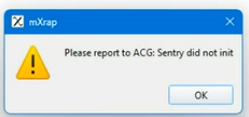
This may appear when running mXrap, About mXrap, mXsync. Sentry is a small process which detects application crashes. The error is caused by incorrect permissions applied to the folders where mXrap is installed.
- Go to
C:\Users\$USER\AppData - Delete
C:\Users\$USER\AppData\mXrap - If you are unable to delete
C:\Users\$USER\AppData\mXrap, rename it toC:\Users\$USER\AppData\mXrap-broken
This hides all of the cache and root data from mXrap, so you will need to find and re-add your root folder, and rebuild your survey cache.
Still broken?
Reach out to with as much information about the error that you have available.