Borehole Survey
The Rock Mass Data Module allows you to import each borehole collar / survey to assign location of all subsequent data such as geology logs, lab tests on core, geotechnical logging, structural core logging and stress measurements on core.
Supported Data Types
- Files imported must be in .csv format (auto-import or manual import)
- Where there is no data available for the remaining columns - leave blank.
- Columns in the .csv file must be in the order specified in the sections below.
- Columns in the specified format, according to this colour code:
- Number column (green)
- Text column (blue)
- Specific Text column (category) - See Table below (orange)
- Date column: yyyy-MM-dd (red)
- Point columns : X Y Z (3 number columns) (pink)

Key Features
Automatic updates from on-site databases
Auto-import of boreholes is possible, mXrap will look at changes of your database on-site and import it into mXrap if it has changed. Please refer to the template to know which columns are needed . Email us at support for site-specific setup.
OR
Manual csv import
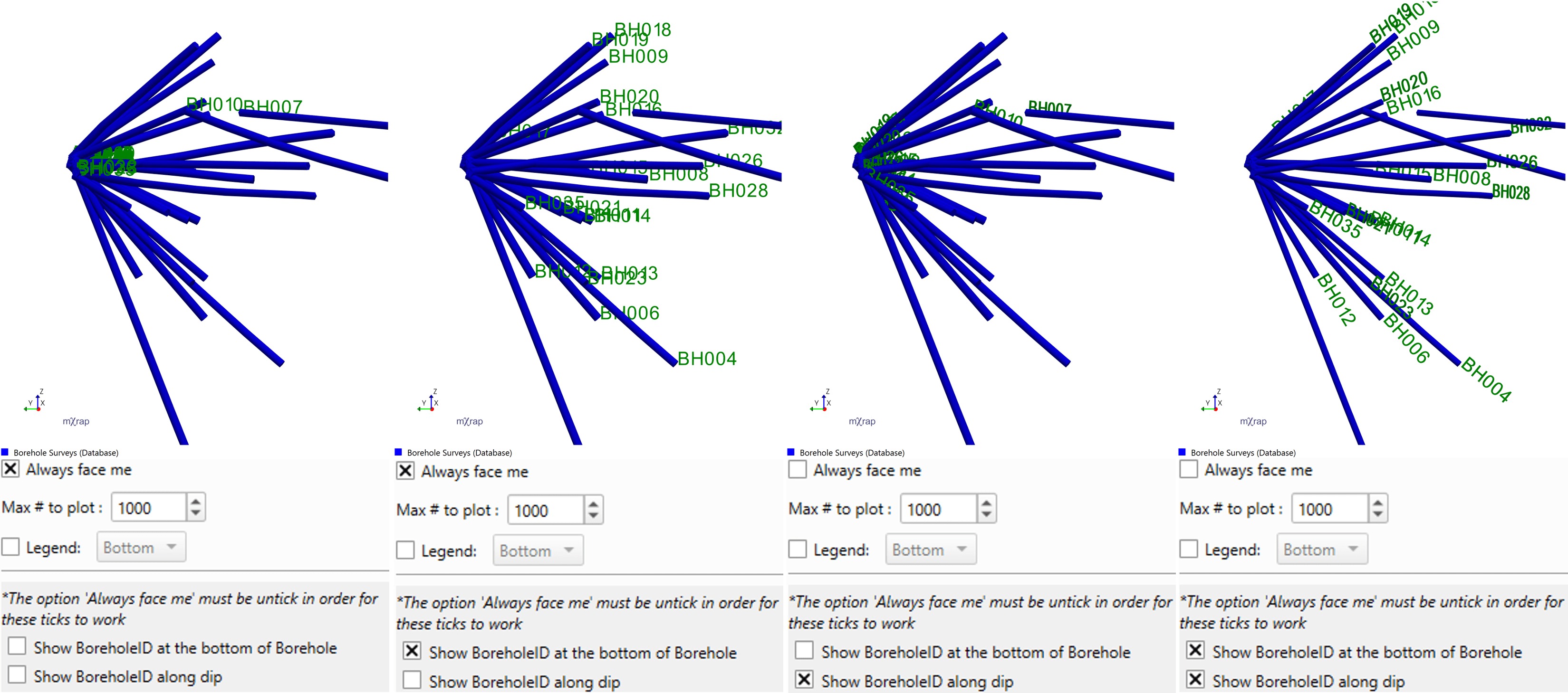
Ability to show the borehole ID along the dip of the hole and at the top or the bottom
In each Window of the Rock Mass Data suite, you can display the text of the boreholes different way:
FAQ
What happens if I import the same borehole twice?
For automatic inputs, the duplicates will remain - you need to ensure that your database is clean. For manual csv import, if you try to import a borehole that already exists, the new data will overwrite the old one for the whole borehole.