5- Export Model
The Mine Geometry Models app provides three distinct model formats, each optimised for different use cases.
Model Format Comparison
| Format | Description | Best For | Export Formats |
|---|---|---|---|
| Boundary Surfaces | Step boundaries only (blocked format) | Visual analysis, lightweight exports | INP, DTM, STL, DXF |
| Block Model | Complete volume with all internal blocks | Numerical modelling (Map3D, FLAC) | INP only |
| Smooth Surfaces | Smoothed recreation of original geometry | Visualisation, presentation | INP, DTM, STL, DXF |
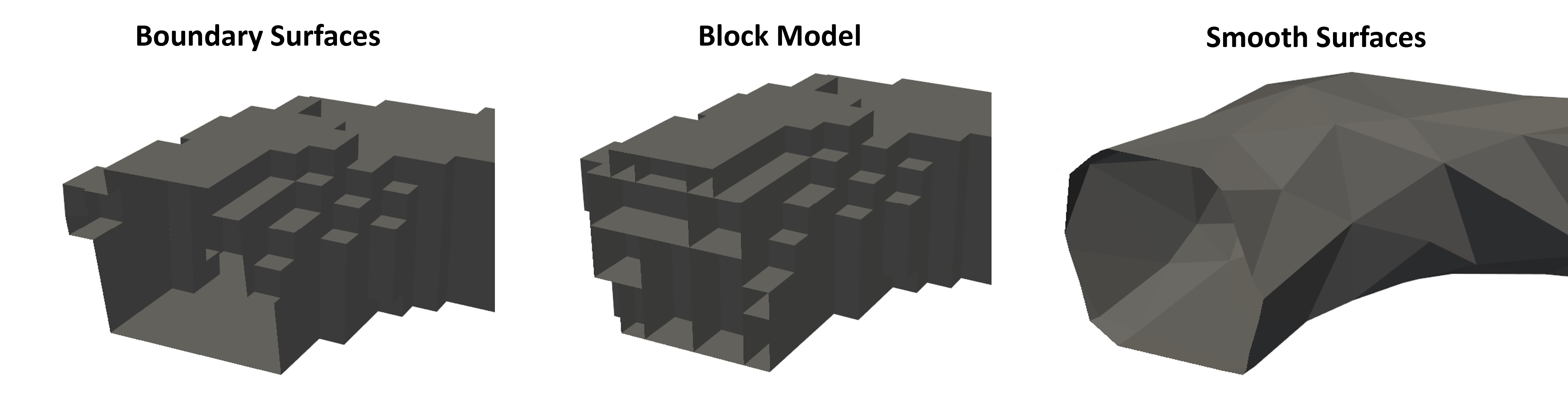
Boundary Surfaces
This format includes only the step boundaries in blocked format. It's ideal for:
- Visual representation of excavation progression
- Lightweight file sizes
- Quick exports for review
The geometry shows the evolution of excavations over time while maintaining the block structure.
Block Model
The block model fills in all intermediate volume between step boundaries:
- Contains complete volumetric information
- Required for numerical modelling packages
- Larger file sizes due to internal blocks
- Only exportable to INP format
This format is essential when you need actual volume information for stress analysis or other numerical modelling applications.
Smooth Surfaces
The smooth surfaces format applies additional processing to create a refined representation:
- Recreates the original survey geometry
- Removes blocky artifacts
- Best visual quality
- Suitable for presentations and reports
Export Controls Parameters
For smooth surfaces, you can adjust:
- Quality Threshold - Trade-off between triangle count and accuracy
- Minimum Interior Angle - Improves triangle quality for modelling
- Number of Iterations - More iterations = better quality but longer processing
For numerical modelling exports:
- Enable "Permute to Avoid Non-Manifold" option
- Enable "Minimum Interior Angle" option
- Increase Quality Threshold to reduce triangle count
- Increase number of iterations for better mesh quality
- Enable "Make Boundary Surfaces Manifold" for compatibility
Supported File Formats
| Format | Description | Typical Use |
|---|---|---|
| INP | Map3D input format | Numerical modelling |
| DTM | Digital Terrain Model / Structure files | GIS applications, visualisation |
| STL | Stereolithography format | 3D printing, CAD software |
| DXF | AutoCAD Drawing Exchange Format | CAD applications, drafting |
Export Process
- Select the desired format (Boundary Surfaces, Block Model, or Smooth Surfaces)
- Provide a descriptive export name
- For INP exports, optionally specify a template file to merge control parameters and materials
- Click the export button for your desired file format
- Access exported files via the "Open Mine Geometry Folder" link
Exported files are organised in subfolders by format type (INP, DTM, STL, DXF) within the Mine Geometry folder.
- Use Boundary Surfaces for lightweight visual exports
- Use Block Model when volumetric data is required
- Use Smooth Surfaces for presentations and reports
- Adjust smoothing parameters based on intended use
- Enable manifold options for numerical modelling compatibility
Videos
Observe the models generated from the building stages and change the export features for use in numerical modelling or other programs that use inp, dtm, stl & dxf.
Troubleshooting
Problem: Export option is greyed out
- The file may be too large for that format
- Try increasing the Quality Threshold to reduce triangle count
- Consider exporting in a different format
- Split the model into smaller sections if necessary
Problem: Exported model doesn't work in numerical modelling software
- Enable "Permute to Avoid Non-Manifold" option
- Enable "Make Boundary Surfaces Manifold" option
- Increase the Minimum Interior Angle setting
- Verify the export format is compatible with your software